
Supervisor: Stacey Cole – staceycole23@gmail.com – 0409 861 223
Director of Training – Orthopaedics – Duy Thai – d.thai@orthowest.com.au – 0409 015 117
4 HMOs
- Footscray – 3
- Joan Kirner – 1
- Williamstown – 1

Checklist for New Starter
- Read through the relevant part of ROVER for the week / job you will be doing (on WeLearn)
- Obtain username and login for
- (1) EMR / BOSSnet – (available from medical workforce)
- (2) iPM – (available from medical workforce)
- (3) AUDIT (Sunray) – accessible only via hospital computer or while using Citrix remote access
- Username: ortho | Password: orthoreg
- (4) Ortho Google Drive (ask one of the unaccredited registrars)
- Username: whorthoreg
- Password: Westernortho
- Get access to Unit calendar from Lidia
- Need to be added to
- Footscray Orthopaedics Whatsapp group (ask one of the registrars)
- inpatient jobs
- NOTE: when messaging in the ortho WhatsApp group – tag the on call reg or ortho relevant reg to ensure things don’t get lost
- Whatsapp PAC group (ask one of the registrars)
- Mybeepr Orthogeries group (ask current ortho resident)
- I’m Special Whatsapp group – cover afterhours surgery for Interns / HMO and some registrars
- Footscray Orthopaedics Whatsapp group (ask one of the registrars)
- Say Hello to Brett Moreira and Duy Thai
- Attend Orthopaedic Induction (run by Andy Griffith), and you also can claim your attendance on a time sheet (Andy will schedule it to occur during your first week)
- Have a look at Orthofracs (medical information) and Orthoanswer (patient information)
Top Tips
Every week you will be in a range of different roles – wards, various clinics and admin duties; instead of reading the whole ROVER through, find out which role you are in that week/that day and read the relevant part of the ROVER
Footscray
- Job description
- Ward Week
- Clinic Week
- Week Off (4-5 days including weekends)
Williamstown
- Job description
- Monday to Friday
- Every 3 or 4th Weekend (Saturday and Sunday) – 8am to 12pm
- Ward round with registrar
Joan Kirner
- Job description
- Monday to Friday
- Every 3 or 4th Weekend covering Special Surgery
Key Contacts
| STAFF – All staff at WH can be contacted on email – firstname.surname@wh.org.au | |
| UNIT STAFF & KEY CONTACTS | CONTACT DETAILS |
| Head of Unit: | Prof Phong Tran – 0403 828 558 – contactphong@gmail.com |
| Registrars | |
| HMO/Resident: | Shyamolie Mathur, Allen Lee, Amy Lew, Andy Qiu |
| 1 W NUM: | Rachel Kropmann |
| 1W Pharmacist: | Trung Tran |
| Unit X Dietician: | – |
| Emergency / MET Call: | 2222 (or 9055-2222 for mobiles) |
| Switchboard: | (834) 56666 |
| IT Help Desk: | (834) 56777 |
| Medical Workforce Unit | (834) 56355 or mwu@wh.org.au |
| A/Prof. Stephen Lew – Director Medical Education | 0466 169 591 |
| Supervisor of Intern Training – Sean Fabri | 0417 507 907 |
| Directors of Training -Surgery * Fiona Reid & * Russel Krawitz | FR 0405 170 104/ RK 0447 022 315 |
| Medical Education Officer – Julie O’Connell (HMOs) | 0481 916 881 |
| Medical Education Officer – Juli Toussaint(General HMOs) | 0401 062 313 |
| Medical Education Officer – Kristian Mitev (Interns) | 0481 476 252 |
Which Registrar Do I Contact?
- Default: Registrar on call. Registrar should be contacted and updated with regard to any issues with inpatients
- What if I can’t contact the registrar on call?
- Urgent: come to theatre
- Get changed and come to theatre. HMOs are encouraged to come if there is an urgent update
- Non-urgent: leave a message or in the whatsapp group and another team member can assist
- Urgent: come to theatre
- Situations where I should contact a specific registrar allocated to the patient’s care
- postop patient – registrar at the operation
- preop or PAC patient to a booked list
- Check the gdrive registrar allocations
- If unsure, default is contact registrar on call and they can guide you to the right person
Weekly Duties
Postop Regime
Day 0
- 40mg SC Clexane / enoxaparin daily
- if eGFR < 30 (or tiny / cachectic) then 20 mg
- If morbidly obese, review for 60mg
- 2g Cephazolin 8 hourly 2 doses post op (1 dose intraop)
- There is a specific order set for 2 doses only
- Note: often post op note says “IV ABx for 24hrs” which is the same as above
- 1g TDS is acceptable if eGFR is < 30.
Day 1:
- FBE, UEC and X-ray if ordered on post op plan
- Get likely PT / OT D/C plan
- SNAP referral within 24 hrs – if flagged by PT/OT
Day 3
- FBE & UEC
- D/C options: home, TCP, GEM, Rehab
Wound Ooze: DO NOT remove dressings! If there’s oozing, take photo to ask reg and reinforce as much as you can.
Also DO NOT REMOVE CASTS to check skin without discussing with reg
All NWB and TWB patients (generally LisFranc’s and ankle #s) and THR/TKR patients need to be discharged on VTE prophylaxis (generally 100mg daily aspirin for NWBs and clexane for THR/TKR) Basically anyone with LL # need VTE prophylaxis.
Orthopaedic Admissions
Note: notify OGS of new NOFs if they aren’t aware – they will also come and admit the Pt
Here is a rough guide to what is important in an orthopaedic admission:
History
HOPC
- List of injuries
- Mechanism of injury – head strike, LOC
- Pain – location, severity, radiations,
- Stiffness, swelling, deformity, weakness or loss of function, instability, sensory changes (if relevant)
- Fasting status
- Private health insurance / DVA / TAC / Workcover
PMHx:
- Particularly cardio vascular and respiratory disease
- Must ask about – diabetes, COPD, AF, CCF, IHD, liver diseas, PVD, coagulopathy
- Surgical history
Medications
- Must clarify:
- anti platelets – aspirin and clopidogrel
- anti-coagulants – warfarin or clexane, novel anticoagulants (Rivaroxaban, Apixaban, Dabigatran)
- steroids
- antibiotics
- insulin
Allergies
Social history
- Living arrangements – NH, HLC, Home
- Mobility – gait aids – SPS, 2WF, 4WF, no gait aids
- Independence level – pADLS, dADLS, cADLS
- Family support structures
- Vocation
- Smoking, alcohol, drugs
Examination
- Look – scars, swelling, deformity, erythema, bruising
- Feel – temperature, tenderness, crepitus
- Move – passive, active
- Neurological status – peripheral sensation, power and reflexes
- Vascular status – peripheral pulses
- Special tests – Provocation, stability
Investigations
- Bloods – FBE, UEC, CMP, co-ags, group and hold,
- If NOF # – Vit-D, B12, folate (geris screen will usually be ordered by Geris unless you care covering in which case order these)
- ECG, X-rays, CT scans, MRI
Mx
- Fast, IV Fluids
- DVT Prophylaxis nocte
- Analgesia
- Regular double aperients (2tab coloxyl+senna + 2sachet Movicol)
- Regular medications charted
- Mark and consent
- Extra bloods ordered as needed
- G&H for all joint replacements
Referrals
- Anaes – refer early for all NOFs or medically co-morbid (usually as soon as you have seen patient)
Gen med or OGS / cardiology / other physician
PAC Follow Up/ Clinic Week
Each week a resident/ intern pair will be allocated to PAC/ PAC follow-up. Mondays include a minor PAC clinic via Telehealth, and Thursdays are allocated to a major PAC clinic via Telehealth (complex patients, anaesthetist present to review all patients). The rest of your roster will include a mixture of allocation for PAC follow-up, x-ray triage, wound and fracture clinic, x-ray meeting (resident only role), theatre, Mr Clifford clinic (Wednesday) and Friday consultant clinic, etc.
During your PAC week, tasks that require your attention will manifest via the “PAC/PACFU jobs” and “Ortho Elective/Trauma” groups on WhatsApp (so be attentive and prompt to those requests), the elective surgery list (chasing outstanding imaging and pathology requests – usually requires contacting patients directly to follow-up) and of course from your Telehealth appointments on Monday and Thursday.
Preadmission Clinic (PAC)
Guideline to Preadmission Clinic
ORTHOPAEDICS PAC GUIDELINES_Rev 2022 + ERAS 2023
Since COVID, PAC is largely run as a phone-call/tele-health clinic. The PAC office where you can conduct your work from is on 1W between 1W ward and theatre. You will each have a room on the right-hand side. Rachel and Julia, PAC nurses will run you through PAC.
On the left is a whiteboard with the patient’s names: they are either for a complete PAC (go through the entire series of pre-op questions; follow a template), or a file review, meaning someone has already completed the PAC, but something needed chasing up.
Monday’s is minor PAC: patients undergoing minor procedures – only get PAC nurse and unit review but no official anaesthetic review. If you have any concerns you can call the anaesthetist in charge.
Thursday is major PAC so each patient will generally be called by the Pharmacist (to get a list of current medications), Nurse (STOPBANG, BMI etc), yourself (Ortho PAC) and Anaesthetics.
To begin a PAC, open patient on EMR, add an Admission Note template (see below). In it, put in your PAC template, as below. Before calling patient, pre-fill what you can: Past Medical History from previous notes, check for Echos and coronary angiograms on BossNet, STOPBANG score on Nurse PAC.
Resources: Ortho PAC guidelines (on googledrive), anaesthetics PAC guidelines (on intranet)
Main focus of PAC
Is the Patient Ready for care?
- Review indication for planned procedure and discuss with patient that they would still like to go ahead with the surgery. (Some patients don’t want to go ahead and therefore their operation should be cancelled or postponed if there is any uncertainty)
- Then review their medical history – if there are any conditions that are not optimised then discuss with the relevant specialist if they can proceed with care and what needs to be done. For cardiovascular/respiratory conditions or if in doubt discuss with anaesthetics
- Note: Bookings office has now started sending PAC patients (major surgery only) for pre PAC bloods – which is really useful to review and highlight any issues
- If a patient is not ready for surgery, either due to their own wishes or medical reasons, a Not Ready for Care form needs to be filled by yourself. This also needs to be communicated to the PAC nurses who will inform the bookings nurses
Campus suitability:
- Review if safe for Williamstown (less support), or would be for only Footscray/Sunshine.
- There are Guidelines regarding this on Intranet (Anaesthetics Department Section). Read these, then if queries, discuss with Anaesthetist. E.g. patients with severe OSA, end stage renal disease, previous complications with anaesthetics, or significant pre-op analgesic demands / opioid tolerance / chronic pain issues / substance abuse issues will usually be deemed only Footscray fit.
Review medication advice
- Diabetes Medications: OHGs and Insulin [See Guidelines]
- Anticoagulants [See Guidelines]
Pre-op tests
- As per Orthopaedic PAC Guidelines (in rooms or on google drive)
- Note: google drive guidelines ask for basic bloods for ALL procedures however for minor surgery (e.g. radius ORIF, removal of metal, arthroscopies etc.) – basic bloods are only required if clinically indicated or >60 years old
- Major surgery (joint replacements): FBE, UEC, Ext G+H, Coags, Iron Studies, CRP, ECG
- Extended group and hold: special G+H for PAC patients that can last for 3 months but needs to be filled in very precisely clearly stating PAC/pre-op and request “Extended G+H” and fill out box on the left asking about previous transfusions/Anti-D > PAC NS can show you how
- Note: patients HAVE to get G+H done at Footrscray/Sunshine pathology
- Imaging: pre-op patients need XR’s within 3 months prior to surgery –
- Check the Ortho PAC guidelines for instructions on particular views + all pre-op XRs need to request “with template markings” in order comments
- XRs are ordered on EMR – provider: “Western Health Outpatients”, urgency/date: “patient to walk in”
- Ideally XR need to be done at Footscray/Sunshine as we use standard template markings known to the surgeons
- Usually the patients will not have a date, so fill in the forms/request, and arrange for them to come to either Footscray or Sunshine about 2 weeks pre-op.
- Footscray path slips can be left in the tray to be picked up by path. Sunshine path slips need to be emailed to wh.dorclinic@dorevitch.com (do not fax PAC slips). You can also mail the patients a copy of the path slips as well (no slip needed for XR ordered on EMR)
PAC Documentation Template
PAC Follow-up
Two components:
- For all patients booked for surgery we check if relevant pathology and imaging has been done – i.e. following up on investigations ordered in PAC or ordering investigations for patients that have not been PACed
- Any follow up jobs that have come up in PAC
- PAC jobs handed over by booking NS/regs (email or PAC follow-up WhatsApp group)
Note: at a minimum by the end of the week all patients for the following week need to be ready for care (sometimes you will just have patients that you can’t get to come in for Ix until the week of their booking, that’s fine but try to avoid it).Ideally patients planned for the following two weeks will also have been contacted to come in for Ix.
PAC Follow Up Document
Our Surgical Liaison Nurses (SLNs) generate and update the elective bookings in the form of an Excel spreadsheet available on the computer shared drive (Toggle to “This PC,” then “Shared” under network locations, then “orthopaedics”. Currently, this is a “read-only file” and can only be edited by the SLNs. I recommend importing that excel file onto our google drive so that you can track your progress (pathology including G&H, imaging, etc.), and our SLNs are very helpful in that they send us a list with the proposed elective surgeries and any changes/ cancellations. Our SLNs are also happy to be contacted directly with questions pertaining to the elective lists.
Work through the list top-down. For each patient
- Check what procedure is required > check Ortho PAC Guidelines document (on google drive) for what pathology or imaging is required (as you would in PAC)
- Check their EMR for PAC admission > were bloods and XR ordered + ensure anything else notes to follow up was followed up
- Check EMR results > note: recent path/XR = within last 3 months
- If there are no recent bloods/XR on EMR à order Ix if not ordered in PAC > Call Pt and inform them that they need to come in to get their bloods/XR.
- Note down on the PAC doc what day they are coming and which hospital so you can follow-up
- Check results
- If results clear – note date of Ix on sheet and tick RFC
NOTE: if unsure what to order/if XR borderline on 3 months etc. Contact the reg allocated to their theatre date (Reg Roster on Google drive) and check with them
Our SLNs will send pathology request forms for FBE, extended G&H, UEC, LFTs, coagulation studies and ECG to our major elective joint replacement patients. We are responsible for ordering pathology for all other elective procedures (if indicated). We need to ensure that these are paired with the correct pre-op X-rays (including template markers for hips and knees) with the appropriate views. Generally, imaging should be within 3 months of the procedure date; however, this is not a hard and fast rule. If in doubt about the types of imaging and pathology requests, contact the registrar assigned to the elective case (can be found on google drive under “WH reg roster”) and they will guide you. The orthopaedics PAC guidelines found in the PAC rooms in the drawers are beneficial in guiding pathology and imaging orders.
Forward your pathology request forms via email to:
whs.dorclinic@dorevitch.com.au AND whf.dorclinic@dorevitch.com.au
Also send out the pathology request forms via email to the patient to ensure they have a copy if it is “misplaced.” Note that G&H requests can only be processed at Footscray or Sunshine campuses, other bloods may be processed at Dorevitch collection centres (ensure you forward the results to “Western Health” on the form if collected externally).
It is essential that the necessary imaging and pathology requests are completed before the operation date. Understandably, patients may encounter challenges attending to these requests before surgery due to other commitments, and they may express that they can’t complete the pre-op investigations. However, we must educate our patients and stress that delaying such investigations may impede surgery and even risk cancellation.
Order pathology as per Ortho PAC guidelines
Things to look out for:
- Hb/Ferritin:
- Major surgeries: Hb is low and ferritin is low see HOBART protocol to see if patient requires a transfusion pre-op; always touch base with the registrar on the operation to see if they want to go ahead.
- Minor Surgeries: check in with registrar
- HbA1c: If patient has likely uncontrolled diabetes, and HbA1c >7%, let registrar know if they are happy to proceed +/- Endo file review
- ECG: if abnormal, compare to old ECGs, and if new or concerning, ask patient about cardiac symptoms (chest pain, exertional SOB), and discuss with anaesthetics
- Any other abnormal results: check with registrar +/- discuss with relevant specialty
Wound Clinic
Wound clinic is ALWAYS overbooked – don’t expect to get out on time on your half day
Notes made on EMR as “Post op ortho”
Check op note and D/C summary (there’s a quick link to both on the “post op” note document) + if not 2/52 post op – check if they have been re-booked to wound clinic and why.
How to create the patient list for review
- On EMR- please click “ambulatory organiser” at the top —> then select Post Op ortho clinic
- This will display all the patients booked for that day in wound clinic
- As soon as the nurses bring the patient in the room they remove the dressing and mark them as “ready for doctor” which is highlighted as orange -on the EMR list
- click on the comment section at the right hand corner of each patient that you are going to pick up and mark your initials – to avoid doubling up( and don’t forget to refresh the screen every time you do so.
- Check op note and D/C summary or operation note which should now be mostly on EMR
- once you are ready to go and see the patient mark it as “in room” and also click and change the room number and then those patients will be highlighted a purple (means someone is seeing them)
What to check:
- Signs/Sx of infection
- Blue/Black sutures (non-removable) need to be removed – review the wound first, if healing well and no signs of infection > ask NS to remove sutures
- Check that pt has been taking VTE prophylaxis as well as signs and symptoms of DVT
If wound is looking good:
- Swap Opsite (waterproof) dressing to Cutiplast (not waterproof) – can shower but just pat dry
- Remove black/blue (ie. non-absorbable) sutures
- Ensure fracture/consultant clinic is booked as per op note > if not, then request on outcome slip
- If they need AH > fill out AH referral forms and give to the nurse who will show them where to go
- If requiring plaster (e.g. if asks to change to camboot or adjust range of HKB or plaster/backslap) > fill out plaster tech referral and give to the NS who will show them where to go
If wound doesn’t look good/any concerns
- Grab a reg in clinic (most of the regs will be in fracture clinic next door)
- Or message the reg on the post op note
DNA’s at the end of clinic:
- those patients who “Did Not Attend(DNA) need to be called and checked on phone if they are doing ok or not
- if they do not pick up call or missed appt or were not aware then rebook them for next week and stress on the phone to attend
- click on those patients on “ambulator list” and in the “ready for nurse “- right click and select “no show”
- this will open another page where you need to fill “please rebook in 1 week” and then select “offer “ on the same page and as above right click and select “appointment at a later date”
- if some of the patients have seen their GP or are with GEM @home and have had their wound checked then you can type” no further appt needed and just offer the an appointment at a later date in fracture clinic /consultant orthopaedic clinic
Fracture Clinic / Consultant Clinic
Use OrthoFracs/ OrthoAnswer/ Orthobullets/ Boneschool and run every patient past a reg or consultant
For Mr Clifford Clinic
- Some weeks there are no patients so check with the Clerks first
- Mr Clifford always sits in room 4 – DO NOT SIT IN ROOM 4
Friday Consultant Clinic – Footscray
- This is a great chance to sit in with the consultants to receive training. All the consultants are very friendly and eager to teach, just ask the consultant if they have time that day. Sometimes, the clinic may be very busy for a particular consultant, but you should easily find one to sit in with.
- One HMO must attend clinic D adjacent to consultant clinic each week to assess campus suitability
Xray Triage
Our role as JMOs is to ensure that patients are triaged appropriately so that they have the correct orders in place on EMR (x-ray requests, plaster tech referral, etc) prior to being consulted by the clinicians in fracture clinic. Fracture clinic occurs every Tuesday at Footscray Hospital. It is quite busy (average 150-200 patients booked) and each one of these patients needs to be triaged by us. This does require some level of understanding of the different types of injuries and which injuries can be demonstrated on certain imaging modalities. If in doubt, order the appropriate x-ray and views of the injured side and confer with a registrar (who are happy to help!).
Refer to the Orthopaedic PAC guidelines document found in PAC (in the orthopaedic folder in the drawers), which contains useful information about different views, including specialised views, and the “how to x-ray triage file” on google drive is a valuable resource (there are two docs one for consultant clinic, one for fracture clinic – consultant clinic is still relevant to fracture clinic and more detailed).
The PAC resident and intern will have time allocated to x-ray triage during PAC week. On Monday of your PAC week you will triage all outstanding patients that haven’t been triaged (usually add-ons over the weekend) for the Tuesday fracture clinic of your PAC week and then for the following Tuesday fracture clinic (the bulk of your x-ray triage). My advice is to start this process early in the week as it is time consuming and, however, one becomes more efficient with practice!
Types of patients:
- New – WH ED vs external (eg GP)
- Review
New patients referred via all WH ED campuses and can be easily looked up on EMR. The same applies to review patients (if they were consulted after outpatients was rolled out on EMR in July 2023, otherwise previous notes are on BOSSnet). For external referrals (only visible on BOSSnet), the GP usually attaches a referral letter with the results of imaging – please hub and spoke these imaging requests promptly, particularly if they are MRI, CT and ultrasound scans (as this is useful to the clinician consulting with the patient on the day). It is cumbersome if these scans aren’t available to the clinicians at the time of review, especially if a patient has soft/ connective tissue injuries! Order repeat x-rays for these new patients if required. Some patients may not require repeat imaging (especially those that have presented for a “clinical review”).
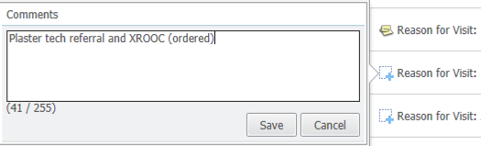
Generally speaking, the most recent clinician’s consult note should guide your subsequent order requests. (eg. A patient with a DR fracture managed conservatively with a FG cast, at 6 week review, remove cast, x-ray out of cast – XROOC). In the above example, two orders are required on EMR (a plaster tech referral to remove the cast and an x-ray request – specifically stating in the order comments XROOC). It’s important to select the correct time interval when ordering a plaster tech referral so that the plaster techs are notified on the day (1 week, 2 weeks, within time of fracture clinic appointment).
- Note: before ordering an XR – check on synapse if one has not already been ordered (will appear as “scheduled”) in which case you only need to fill out plaster tech referral if required
The triage process has changed (in a better and more efficient manner) since EMR rolled out outpatients. Open up “ambulatory organiser” on powerchart and select the correct date corresponding to a Tuesday and select “ORTHO FH Fracture AM; ORTHO FH Fracture PM” and this will generate a list of the patients booked for fracture clinic that day. This will continue to update as more patients are booked in fracture clinic.
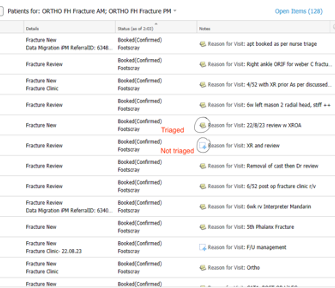
We use the notes section to triage patients (those with a “+” visible next to their note have not yet been triaged and those with a paperclip symbol have been triaged – see first screenshot below). After you have reviewed the referral/ previous review note and determined what/ if orders are required then simply make a note of your request and keep it simple and transparent for our nursing and clerical staff (see second screenshot below). Continue this process for every patient and happy triaging!
Basic principles
- New referrals: need an XR within the last 7 days – looking at alignment
- 6-8/52 post op: need an XROOP – looking for union and healing
- Foot/ankle XRs usually need to be “weight bearing” but check with the HMO/reg
- For all others: check previous EMR notes for instructions – if previous notes require other imaging modalities e.g. MRI/CT/US, then no action is required and no XR needs to be ordered, these will be ordered by regs
- If in doubt better to order an XR than not
The Audit/ Sunray
http://whsortho2.wh.org.au/whorth/
Username – ortho
Password – orthoreg
The AUDIT is very important to the running of the orthopaedic unit. It is the responsibility of the ward person. The AUDIT is an ortho-specific patient list and is ultimately a snapshot of all the patients for everyone on the team. The following is a helpful guide for what information should be updated in the audit:
S – story – including mechanism of injury, where they are from (home, NH ect), pre-morbid function (walks unaided / or w 4 WF ect)
H – PMHx (in the comorbidities section)
O – operation (in the operation section)
W– weight bearing status
B– bloods – Hb and eGFR for all patients. 2nd to 3rd daily serial CRP for infected patients and any other bloods that are relevant (INR if on warfarin).
P – plan – operative plan if pre-op, D/C plan if post-op
Steps:
- Adding: Add to audit (only fill in details until DOB) > add admission (consultant name on Google Drive, ensure “inpatient” status) > add “new” theatre episode à add procedure “Pre operative” > save > fill in MOI, diagnosis and comments (plan) > if pt rather co-morbid, include co-morbidities
- Update: check Audit pt list against EMR and trauma sheet à update once post-op (reg responsibility) by finding patient’s op report in folder > update plan, Ix results and d/c destination in “comments” section > update again once pt discharged
- Print: reports > ward list > refresh empty page > print (80-85% scale)
Tips:
- Remember to save all the time.
- Copy and paste from trauma sheet.
Add new patients into the AUDIT as they come in, or in the morning if they came in overnight. Populate their details as you find in the admission note. If in ED, check on EDIS Dashboard which bed, and write it in the Comments section, e.g. Y5, to facilitate finding them easily on the WR. Ensure that the list of patients (Ortho and OGS) on EMR correlates to where the patients are on the AUDIT, because patients move around a lot. Ensure that Consult patients are added to the AUDIT.
It doesn’t accept apostrophes (‘) in the comments section – it won’t allow you to save the details.
You have to make sure you’ve populated all sections: Pre-op, Side (Right or Left), Injury/Mechanism otherwise it won’t save.Also make sure you don’t click on “previous page”, because you lose all your work
If there is a problem with the audit, please contact our database manager – Oren Tirosh. Oren is a lovely person, and will be able to help you out.
X-Ray Meeting
X-Ray meeting occurs on a Friday morning at 7am. X-rays from the operations over the past week are presented by a registrar and resident. The residents on the unit (all sites) are on a rotating roster and will prepare the xrays as part of the presentation, help to set up on Friday morning, and click through the images during the meeting while the registrar is presenting the patients.
Tip: This is a great chance to get yourself know by the unit, so ask Lidia to print out a name tag for the desk, so everyone can learn your name
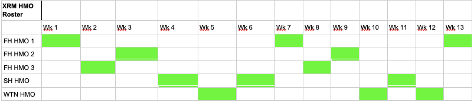
A HMO is allocated to putting together XRM and a reg is allocated to presenting it.
Proposed XRM HMO roster is below. Can arrange swaps and/or modify based on FH HMO roster (they are allocated XRM when on clinic week only, as ward week can be very chaotic)
How to XRM
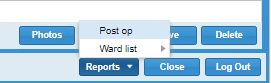
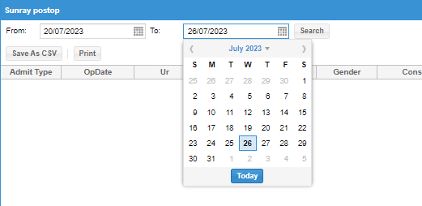
- Generate a post op list on the audit
- Reports then post op
- Choose dates of interest – it is always Thursday to Wednesday
- Rearrange the admit type so emergency patients are at the top and elective cases at the end and press save as CSV
- Open up the excel spreadsheet and compare it to the operations which were completed according to EMR
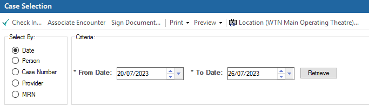
- Open up EMR and click on case selection from the taskbar
- Location: pick WTN Main Operating theatre (you will also have to do it for Footscray and Joan Kirner but can only do it one at a time)
- Dates: Use the same Thurs to Wed dates
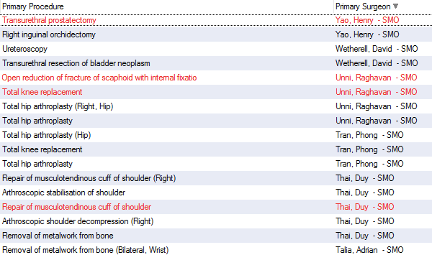
- Order the list based on Primary surgeon, as you go down the list crosscheck that operations done by ortho surgeons are on the audit (if they appear in red, they were likely cancelled surgeries and therefore would not appear on the audit Excel sheet). If you are unfamiliar with ortho surgeons on the unit (there is usually an up-to-date list in the ortho reg handbook also in the google drive) and/or you can crosscheck the operation based on the primary procedure completed.
- If there are any operations in the EMR that are missing from the audit, then add the cases into the audit by reading the operation note (most of the time it is that the dates are incorrect or the “post op” tickbox was not ticked, make the changes and save them).
- Then do the same thing with Footscray Main Operating Theatre and Joan Kirner Main Operating Theatre.

- Regenerate the post-op list from the audit as per first step.
- Make sure all the cases you added to it are now on there
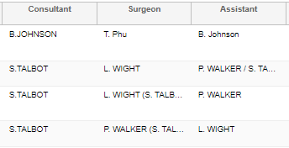
- Screen the list to make sure the following:
- Admission type is correct (Emergency cases are any cases admitted from ED or fracture clinic. Elective cases are usually those that came from Consultant clinic). As a general rule most joint replacements, foot and ankle reconstructions, tendon or ligament stabilisations/reconstructions, removal of metal are elective cases.
- Consultant is correct (the surgeon who operated, assisted or supervised the operation is the consultant in charge for that patient, so make sure they match).
- Regenerate the post op list from the audit as per step 1 (this should be the last time!)
- Highlight any cases that won’t need to be presented. As a general rule – removal of metals, native joint washouts, arthroscopies, wound debridements/washouts do not need to be presented (if there is no post op XR or II, then chances are they do not need to be presented). If in doubt, ask the reg on XRM for the week for advice.
- Send the list to the reg on XRM
- Generating the XRM on Synapse 5 (Synapse web)
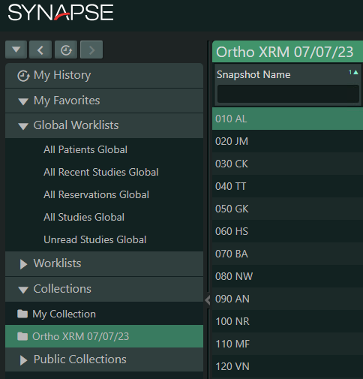
- Right click on collections and select new folder
- Name the folder (i.e. Ortho XRM 28/7/23)
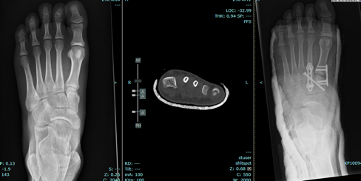
- Open up your first patient (ie the first one on your final excel spreadsheet)– select the series of images to display (usually preop out of cast, any relevant CT scans/MRIs, post op XRs). Ensure the images you choose are “all images” rather than just an AP or Lateral View because you need it to scroll through each one of the day.
- Right click on the camera shutter icon in the toolbar, number it (start w 010 + pt initials then go up by increments of 10 i.e 010AB, 020TC, 030DE etc) and ensure it is being saved under your new collection i.e. XRM 28/7/23.
- Do this for all patients
- Make sure the list is ordered according to snapshot name and drag the snapshot name column to the very left to make it easier to click on different images on XRM day
- Once completed (ensure to put in discussion cases as well – usually found in the Footscray trauma drive) right click on the collection and choose “sharing-make public”. This will allow your reg on XRM with you to make any desired changes as required.
- N.B. Andy’s videos are still an excellent resource for how to use/navigate the audit – you can find them in the folder labelled “Andy’s videos”
Research
If you are interested in research, please speak to Prof Phong Tran / Libby Spiers
Interested in pursuing Orthopaedics
That’s great, orthopaedics is awesome and we make a huge difference to the quality of life of our patients. Please contact Prof Tran / Duy Thai / Brett Moriera to discuss career planning and our mentorship program
Training and Education
7 am – Registrar Presentation
Learning resources for HMO and Interns
Create Basic training Youtube Videos
- Examining patients
Friday Mornings General Surgery Education – 12 pm
Resources
WH HMO Orientation Handbook Package V1.1-Aug-2023
Resident Roles
| HMO | Roles |
|---|---|
| Francesca Sasaneli | Intern |
| Amy Luu | Intern and Resident Theatre Attendance Roster |
| ? | HMO roster for Clinic D including assessment for fitness form |
| Shyamolie Mathur | |
| Matthew Sun | |
Contributors and Authors
Updated by: Toan Phu – quoctoan.phu@wh.org.au Date: 02/08/2023
A.El-Bitar, C.Sinha, F.Sasanelli Date: 21/08/2023 (awaiting MEU review)
Reviewed by: Medical Education Unit Date: 02/08/2023